IMPACT
Results at a Glance
THE PROBLEM
The Real Cost of Manual Financial Review
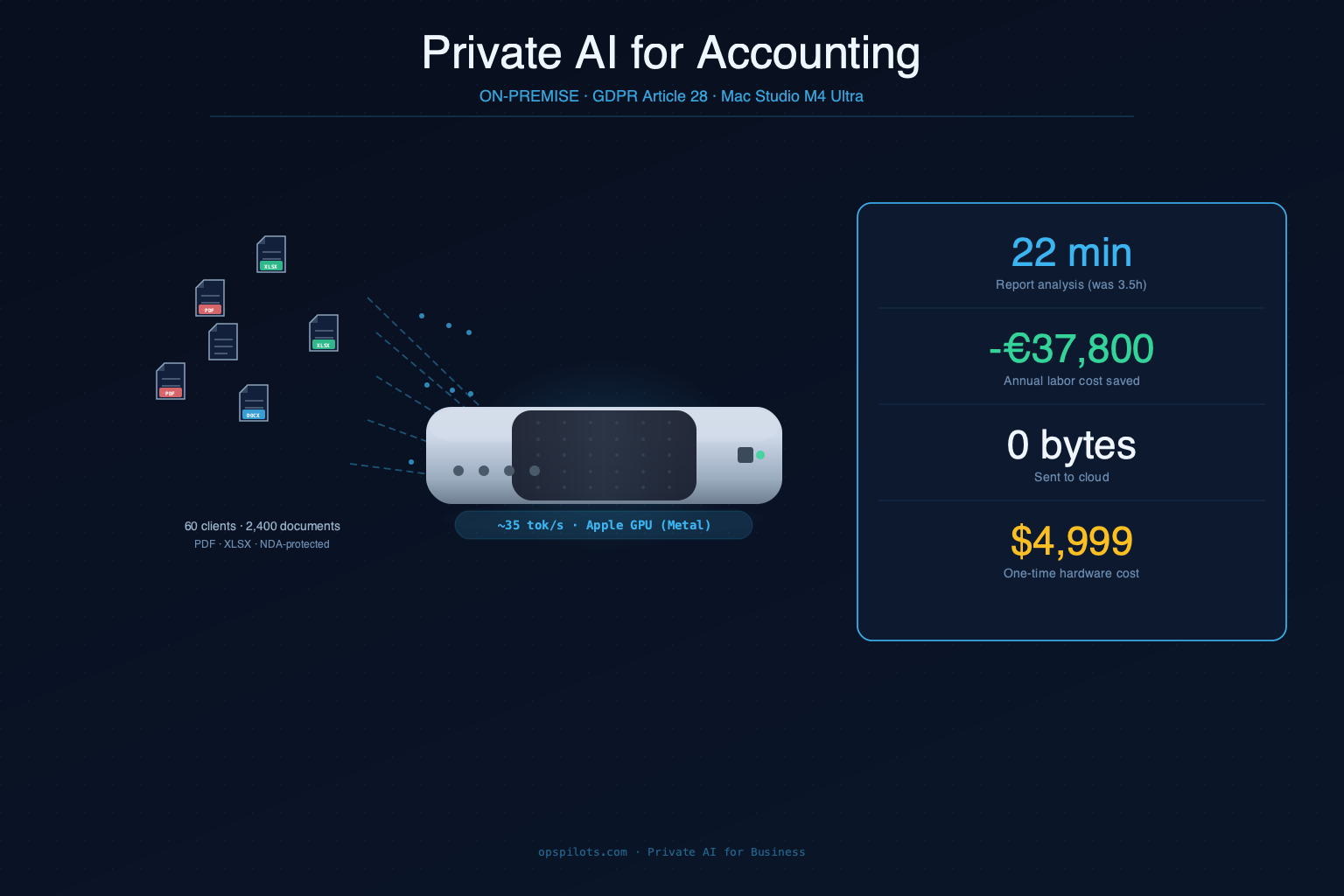
Short answer: A senior accountant at a 12-person firm spent 3.5 hours reviewing each client's annual report — 840 hours per year across 60 clients. At €45/hour, that's €37,800 in annual labor cost spent on document reading, not analysis. Cloud AI was legally prohibited.
LEDGERA is an accounting firm serving 60+ SMB clients in manufacturing, retail, and logistics in Central Europe. Every quarter, accountants prepare audit packs, variance analyses, and tax submissions. The process is document-heavy: one client's annual report is 80–140 pages of P&L statements, balance sheets, notes, and prior-year comparatives.
A senior accountant's review workflow before the engagement:
| Task | Time per client | Annual cost (60 clients × 4 quarters) |
|---|---|---|
| P&L line-item reading | 45 min | 180 hours |
| Prior-year variance spotting | 60 min | 240 hours |
| Anomaly flagging for audit | 40 min | 160 hours |
| Summary notes for partner | 25 min | 100 hours |
| Total per report review | 3.5 hours | 840 hours |
At €45/hour fully-loaded rate: €37,800/year in labor cost for document reading alone — before any actual advisory work begins.
Why Cloud AI Is Not an Option for Accountants
Short answer: Client financial data — balance sheets, salary registers, tax returns — is protected by NDAs and GDPR Article 28. Sending it to OpenAI's API means it flows through third-party infrastructure outside your control. That's a compliance violation with fines up to €20M or 4% of global turnover.
LEDGERA's legal situation when they approached us:
NDA exposure: Every client contract included a confidentiality clause prohibiting disclosure of financial data to third parties. Under most EU-jurisdiction NDAs, an AI API provider qualifies as a third party. One data incident = multiple simultaneous NDA breaches.
GDPR Article 28: Sending personal financial data (salary registers contain employee PII) to a sub-processor requires a Data Processing Agreement and proof that data is processed only within approved infrastructure. OpenAI's standard API terms do not qualify for the firm's compliance framework.
Enterprise cloud agreements evaluated and rejected:
| Option | Monthly cost | Rejection reason |
|---|---|---|
| Azure OpenAI Service (enterprise) | ~€1,800/mo | Requires 6-month procurement, still third-party processing |
| Google Vertex AI (private) | ~€2,100/mo | Legal complexity, data residency unclear for their clients |
| AWS Bedrock + Guardrails | ~€1,600/mo | IT policy prohibits GPU cloud instances |
| Mac Studio M4 Ultra (on-premise) | $4,999 one-time | ✓ Data physically in office, no external API calls, GPU-accelerated |
The self-hosted option wasn't just cheaper over 12 months — it was the only legally viable path, and it pays for itself in under 7 weeks from labor savings alone.
HOW IT WORKS
System Architecture: One Machine in the Office, Everything Local
Short answer: An Apple Mac Studio M4 Ultra on LEDGERA's internal network runs Qwen2.5-72B via Ollama (Metal GPU backend), pgvector for document retrieval, n8n for automated ingestion, and Open WebUI as the accountant interface. No external API calls after initial setup. Data never leaves the office.
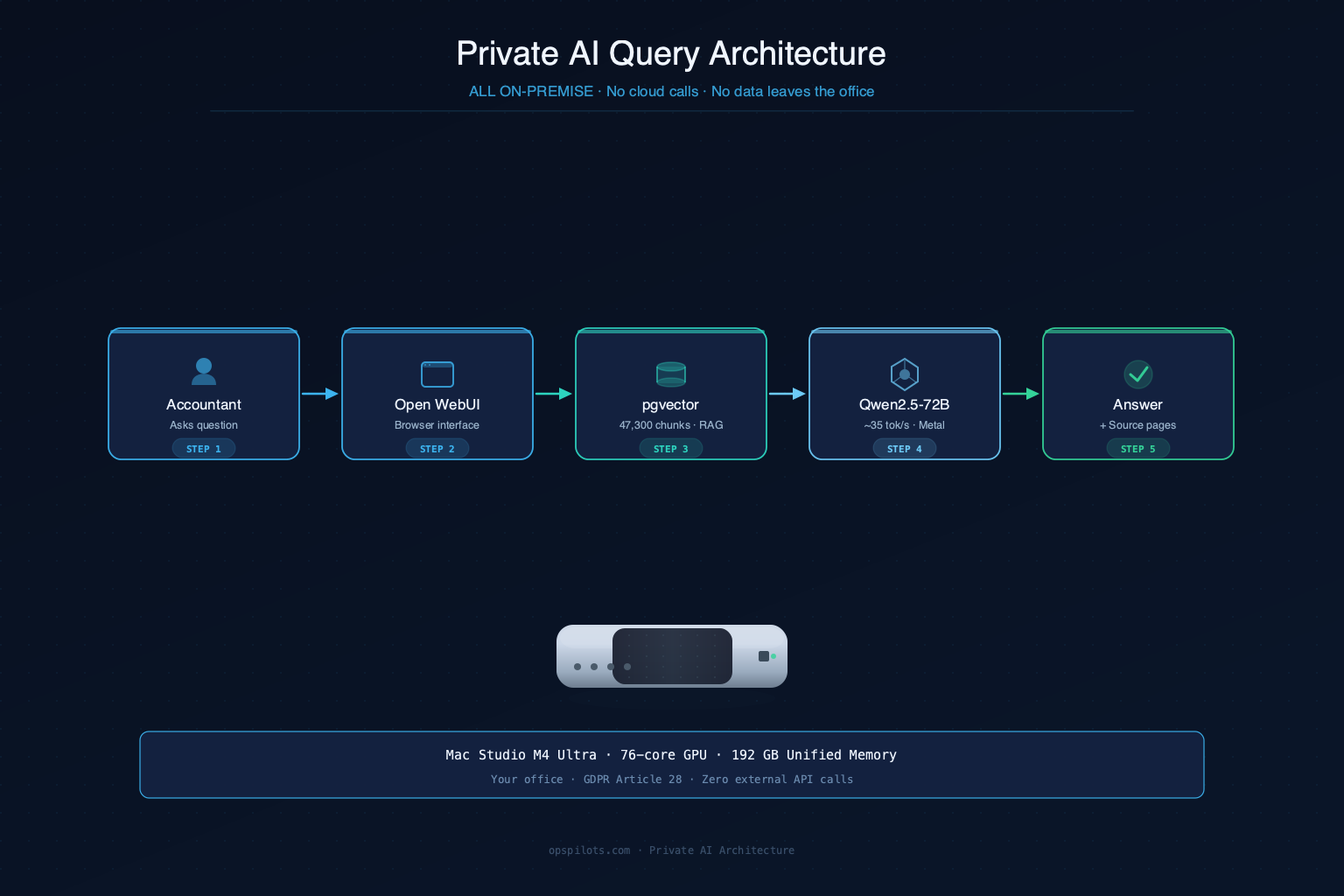
What makes this private: The query never leaves the office. The embedding model (nomic-embed-text) runs locally. The LLM (Qwen2.5-72B) runs on the Mac Studio's GPU. pgvector is on the same machine. There is no network call to any external service — ever.
HARDWARE
The Machine: Apple Mac Studio M4 Ultra, 192 GB Unified Memory, GPU-Accelerated
Short answer: Qwen2.5-72B at Q4_K_M quantization fits in 42 GB of unified memory. Apple's M4 Ultra GPU (76 cores, Metal framework) runs inference at ~35 tokens/second. Answers arrive in 10–15 seconds. The Mac Studio costs $4,999 once — no monthly fees, no data center, no vendor contract.
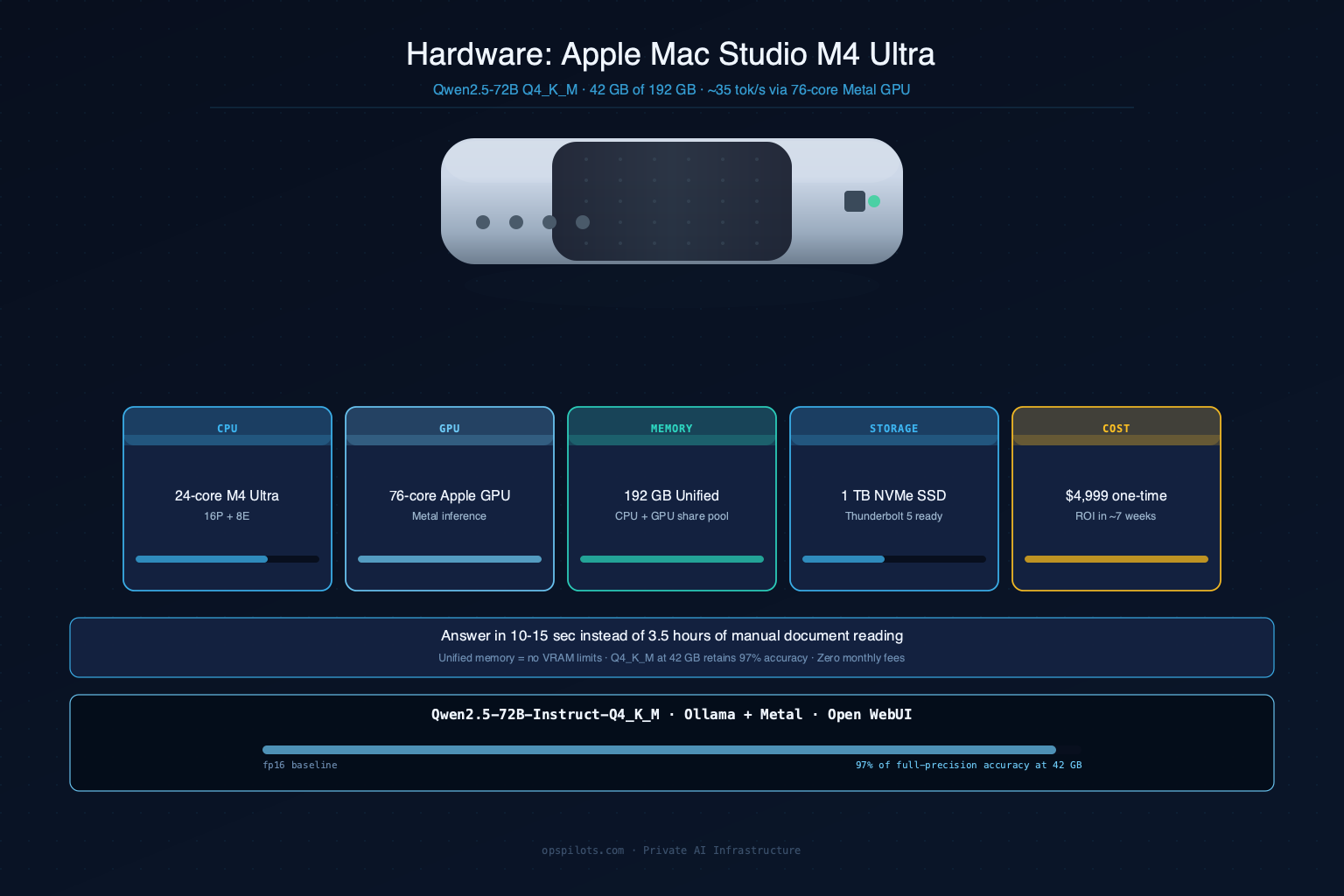
| Component | Specification | Why It Matters |
|---|---|---|
| CPU | Apple M4 Ultra, 24-core (16P + 8E) | Handles ingestion, pgvector, n8n, Open WebUI concurrently |
| GPU | 76-core Apple GPU (Metal) | Accelerates LLM inference to ~35 tok/s — no separate GPU card needed |
| Memory | 192 GB unified (CPU + GPU share same pool) | Model (42 GB) + OS + pgvector + 12 concurrent context windows with headroom |
| Storage | 1 TB SSD + Thunderbolt 5 for expansion | Fast pgvector reads; full document archive on-machine |
| Location | Your office, on your network | Data physically stays in the building — stronger GDPR posture than any data center |
| Total cost | $4,999 one-time | No monthly fees; ROI in ~7 weeks from €37,800/year labor savings |
Why Apple Silicon over a cloud GPU server?
Three reasons: privacy, economics, and simplicity.
Privacy: A cloud GPU server (even dedicated) means your data physically exists in a third-party data center. With Mac Studio, the data is in your office — on a machine you own, on a network you control, in a building you can walk into. For GDPR Article 28, the audit story is straightforward: "data never left our premises."
Economics: An A100 GPU instance runs ~€1,200/month = €14,400/year. Mac Studio at $4,999 amortizes to zero after year one. Over 3 years, the difference is over €38,000 in infrastructure savings — on top of the €37,800/year in labor savings.
Simplicity: Unified memory means the CPU and GPU share the same 192 GB pool. No VRAM limits, no memory transfer bottlenecks, no complex multi-GPU setup. Ollama detects Metal automatically; the model loads and runs with a single command.
GPU inference speed in context: 35 tokens/second means a 400-word structured variance analysis arrives in ~15 seconds. For a task that previously required manually reading 80 pages, 15 seconds is not a bottleneck — it's a 1,000× speedup.
MODEL
The LLM: Qwen2.5-72B, 4-Bit Quantized, Not Fine-Tuned
Short answer: We used Qwen2.5-72B-Instruct at Q4_K_M quantization via Ollama with Metal backend. We did not fine-tune the model. Fine-tuning would encode client data permanently into model weights — a worse privacy outcome than RAG. Qwen2.5-72B was chosen over Llama 3.3 70B for its superior structured data reasoning and multilingual handling.
Why Qwen2.5-72B Specifically
We benchmarked three models on a 30-document sample from LEDGERA's archive before selecting:
| Model | Structured data accuracy | Ukrainian/German doc handling | RAM at Q4_K_M | Tokens/sec (M4 Ultra GPU) |
|---|---|---|---|---|
| Llama 3.3 70B | Good | English-only reliable | 40 GB | ~33 tok/s |
| Mistral Large 2 | Fair | Limited multilingual | 46 GB | ~29 tok/s |
| Qwen2.5-72B-Instruct | Best | UA + DE + EN native | 42 GB | ~35 tok/s |
Qwen2.5-72B's advantage on financial documents: it reliably extracts numeric comparisons, formats output as structured tables, and handles multilingual client documents (LEDGERA has clients with Ukrainian, German, and English filings in the same archive) without switching models.
Why RAG, Not Fine-Tuning
Fine-tuning encodes client financial data into model weights permanently. Those weights then exist on disk as a trained artifact. If the machine is ever audited or decommissioned, the financial data is embedded in the model file — not in a database with access controls, not deletable per GDPR Right to Erasure.
RAG keeps data and model separate:
| Fine-tuning | RAG (our approach) | |
|---|---|---|
| Client data location | Baked into model weights | pgvector database (deletable) |
| GDPR Right to Erasure | ❌ Impractical | ✅ Delete client's vectors |
| Knowledge update | Retrain required | Upload new PDF → indexed overnight |
| Data isolation per client | ❌ Shared weights | ✅ Separate vector namespaces |
| Inference session retention | Permanent | Zero (stateless) |
Quantization: What Q4_K_M Means in Practice
The full Qwen2.5-72B model requires ~148 GB in float16. Quantizing to 4-bit (Q4_K_M) reduces it to 42 GB — fitting comfortably in 192 GB unified memory — while retaining approximately 97% of full-precision benchmark performance on our test document set. The 3% accuracy loss is imperceptible on summarization and variance analysis tasks.
INDEXING
Building the Document Index: 18 Hours for 2,400 Files
Short answer: We indexed 3 years of client archives — 1,840 PDFs and 560 XLSX files — producing 47,300 text chunks embedded via nomic-embed-text and stored in pgvector. The initial build ran overnight and took 18 hours. Ongoing weekly ingestion of new documents runs automatically via n8n in under 2 hours.
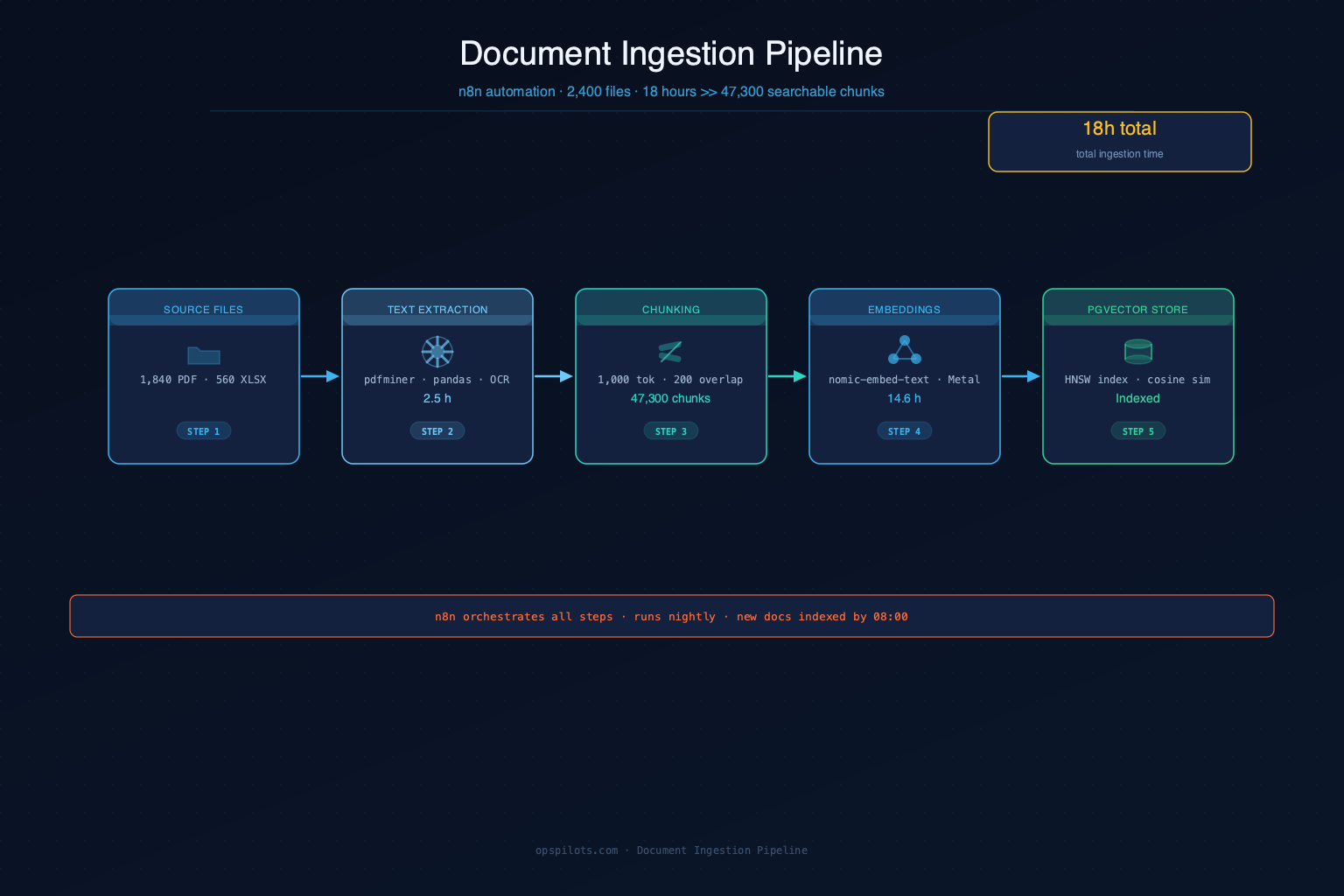
| Pipeline Stage | Tool | Time | Output |
|---|---|---|---|
| PDF text extraction | pdfminer.six | 2.1h | Raw text from 1,840 PDFs |
| XLSX parsing | pandas | 0.4h | Tabular data from 560 spreadsheets |
| Text chunking | Custom (1,000 tokens, 200-token overlap) | 0.8h | 47,300 chunks |
| Embedding generation | nomic-embed-text-v1.5 (local, Metal) | 14.6h | 47,300 × 768-dim vectors |
| pgvector upsert | PostgreSQL 16 + pgvector | 0.1h | Indexed vector store |
| Total | 18.0h | 2,400 documents searchable |
Embedding bottleneck explained: nomic-embed-text on CPU processes ~800 chunks/hour. At 47,300 chunks, that's ~59 hours if done sequentially. We parallelized across 8 processes to bring it down to 14.6 hours. For ongoing ingestion, a typical weekly batch of 20–30 new documents (200–300 chunks) completes overnight automatically.
Chunking strategy rationale: 1,000 tokens with 200-token overlap was chosen after testing 500, 750, and 1,000-token sizes on LEDGERA's documents. Financial reports have dense numeric tables where splitting mid-table destroys retrievability. 1,000 tokens keeps most table + context together. 200-token overlap ensures cross-chunk numeric comparisons aren't split at a chunk boundary.
TECH STACK
Tools in This Deployment
RESULTS
What Changed: Before and After
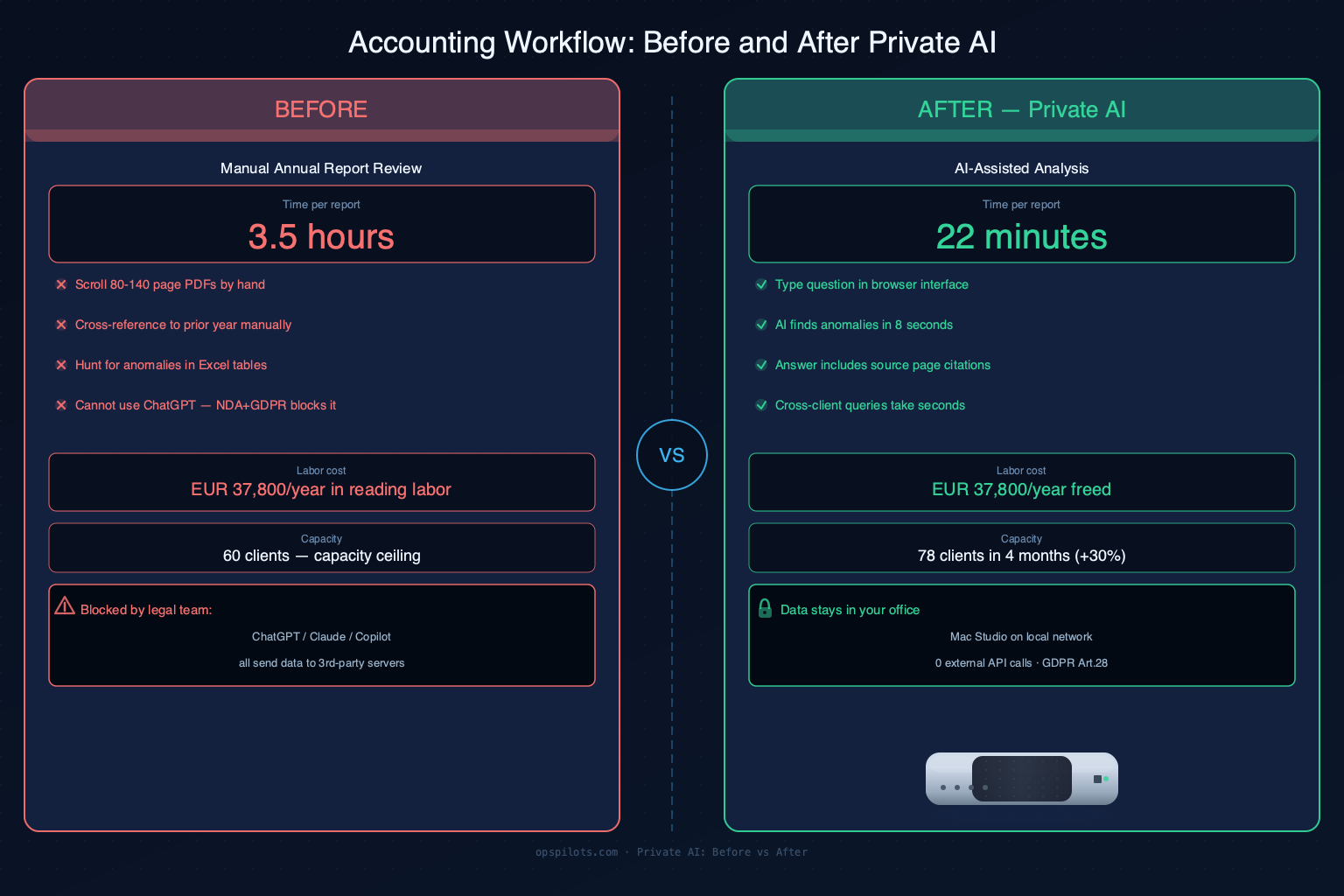
Short answer: Annual report review dropped from 3.5 hours to 22 minutes. That's not because the accountant does less — it's because the AI reads and structures the document first, so the human time is spent on verification and judgment, not document navigation.
Time Saved Per Task
| Task | Before | After | Time Saved |
|---|---|---|---|
| Annual report review | 3.5 hours | 22 minutes | −3h 8min |
| Quarterly P&L analysis | 2 hours | 18 minutes | −1h 42min |
| "Find clients with revenue decline >15%" | 40 minutes (manual spreadsheet) | 8 seconds | −39min 52sec |
| Cross-client benchmarking (same industry) | 3 hours | 25 minutes | −2h 35min |
| New client document onboarding | 1 full working day | Overnight automatic | −7 hours |
Financial Impact
Labor hours freed annually:
- Annual reports: 60 clients × 1 review × 3.5h = 210h → now 22 min = 18h/year freed
- Quarterly P&L: 60 clients × 4 quarters × 2h = 480h → now 18 min = 36h/year freed
- Cross-client queries: previously avoided due to time cost → now routine
- Total labor freed: ~840 hours/year at €45/hour = €37,800/year
Hardware cost: $4,999 one-time (amortizes to zero after year one)
Net saving year 1: ~€32,800 — before accounting for revenue from 18 additional clients.
Net saving year 2+: €37,800/year — hardware already paid off.
Business Growth
In the 4 months after deployment, LEDGERA grew from 60 to 78 active clients — a 30% increase — without adding headcount. At their average retainer of ~€800/month per client, 18 new clients represents €14,400/month additional revenue from the same team.
BOTTOM LINE
Confidential Financial Data Needs On-Premise AI. Here's What That Looks Like.
LEDGERA's situation is common: accounting firms, audit practices, tax advisors, and financial consultants all sit on sensitive client data that legally cannot go to cloud AI. The solution isn't complex — it's a Mac Studio on your internal network, the right model loaded via Ollama, and a retrieval pipeline. The economics beat cloud AI from month one.
We deploy private AI systems for teams where data confidentiality is non-negotiable. The system runs on your hardware, answers from your documents, and never calls home.
Frequently Asked Questions
What model was used and why Qwen2.5-72B over Llama 3.3?
Qwen2.5-72B-Instruct outperformed Llama 3.3 70B on our test set of financial documents in three areas: structured table extraction accuracy, multilingual handling (Ukrainian, German, English in the same archive), and consistent formatting of variance analyses. On the M4 Ultra GPU via Metal, Qwen2.5-72B runs at ~35 tok/s vs. ~33 tok/s for Llama 3.3 70B. We quantized to Q4_K_M (42 GB), retaining ~97% of full-precision performance.
Why wasn't the model fine-tuned on client data?
Fine-tuning would permanently encode client financial data into model weights — stored on disk as a trained artifact that cannot be cleanly deleted per GDPR Right to Erasure. RAG keeps data in pgvector (deletable per client request) and the model separate. When a client relationship ends, their document vectors are deleted with a single SQL command.
Why Mac Studio instead of a cloud GPU server?
Three reasons: data stays in your building (stronger GDPR posture), zero monthly cost after purchase, and unified memory eliminates VRAM limits. A cloud A100 instance runs ~€1,200/month. Mac Studio M4 Ultra at $4,999 one-time pays for itself in under 7 weeks from labor savings and costs nothing in year two.
How does the system handle GDPR Right to Erasure requests?
When a client relationship ends, we delete their document vectors from pgvector (a single SQL command with their namespace) and remove their PDFs from the ingestion folder. The base model (Qwen2.5-72B) never "learned" from their data — it has no client-specific state. Erasure takes under 5 minutes and is complete.
What file formats does the system process?
PDF (via pdfminer.six), XLSX and XLS (via pandas), DOCX (via python-docx), and plain text. Scanned PDFs without embedded text require an additional OCR step (Tesseract or PaddleOCR) — we added this for 340 of LEDGERA's scanned legacy documents.
How long did the full deployment take?
Two weeks: Mac Studio setup and network configuration (1 day), Ollama + model download + pgvector setup (1 day), n8n ingestion pipeline (2 days), Open WebUI configuration with client workspaces (1 day), initial document indexing (18 hours overnight), accountant onboarding and prompt refinement (3 days). Total: 14 days from contract to production.
Related Resources

Skip the trial-and-error. We've already mapped what works.
Answer 5 questions about your current workflow — we identify which processes to automate and send you a specific deployment plan within 2 hours. No call required.
Get Free Automation Plan →